
If you’ve received an invitation to join a CPA organization on TaxMingle, follow these simple steps to accept and activate your account.
Step 1: Check Your Email
Look for an invitation email from TaxMingle with the subject line similar to “You’ve been invited to join a CPA organization on TaxMingle.”
Click the secure invitation link provided in the message.
Step 2: Set Up Your Account
Once the link opens in your browser:
Click on Invite Client, then:
- You’ll be directed to a registration or login screen (depending on your existing status).
- If you already have a TaxMingle account, log in using your credentials.
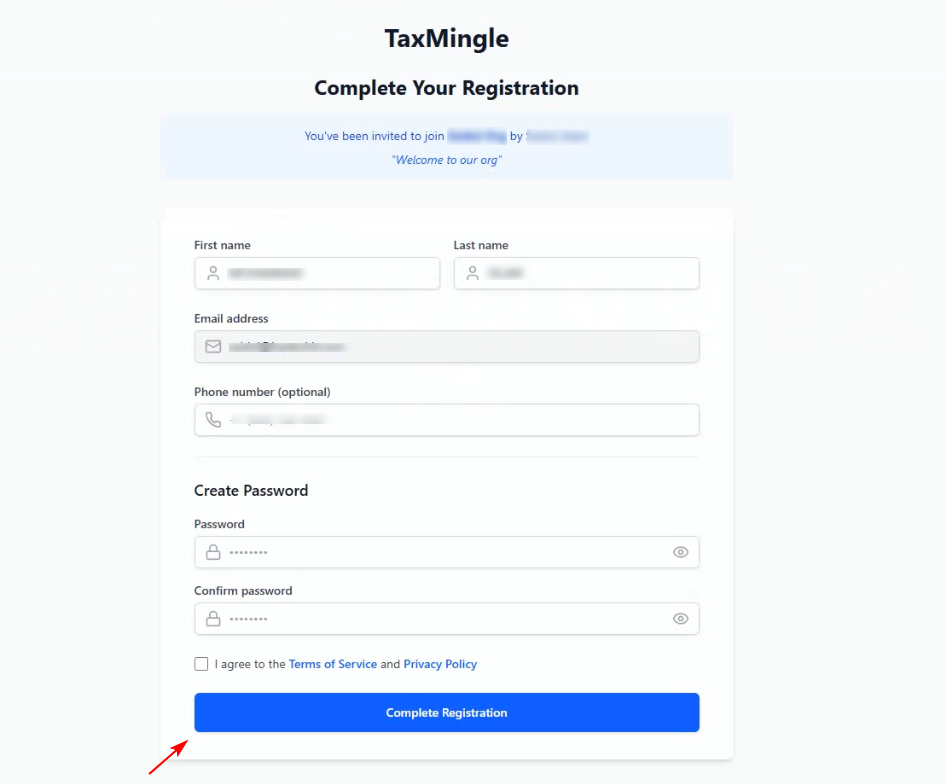
- If you’re new, follow the prompts to complete your registration (name, email, and password setup).
Step 3: Confirm Your Access
After logging in or registering:
You can:
- You’ll be added to the CPA organization that invited you.
- Your dashboard will update to reflect your new access.
- You’ll be able to view shared documents, receive messages, and begin collaborating with your team.
Need Help?
If the link has expired or you’re having trouble accessing the invitation, please contact TaxMingle Support for assistance.